¶ Huobi - Create New API
The following is a general tutorial for creating an API. However, we recommend using sub-account APIs for trading whenever possible to reduce the risk to the main account. Sub-accounts are independent accounts that contribute to enhanced security and facilitate the assessment and optimization of different trading strategies' performance.There will be a separate page description for the sub-account API.
Sub-Accounts Page
¶ 1.Login to Huobi official website
(1)Go to Huobi official website and log in
(2)Click on your profile picture in the upper right corner, then find [API Management] and click on it.
¶ 2.Create API
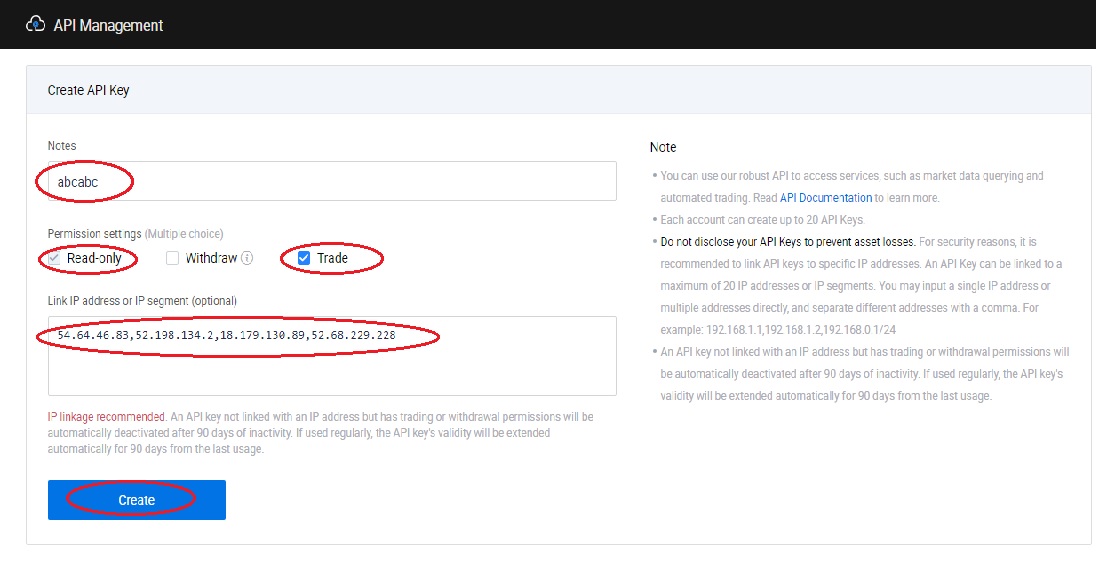
(1)On the API Key management page,
[Notes] Fill in the name you need;
[Permission settings (Multiple choice)] Check [Read-only] and [Trade].
[Link IP address or IP segment (optional)] Copy and paste the following IP
54.64.46.83,52.198.134.2,18.179.130.89,52.68.229.228Then press [Create]
¶ 3. Complete setup
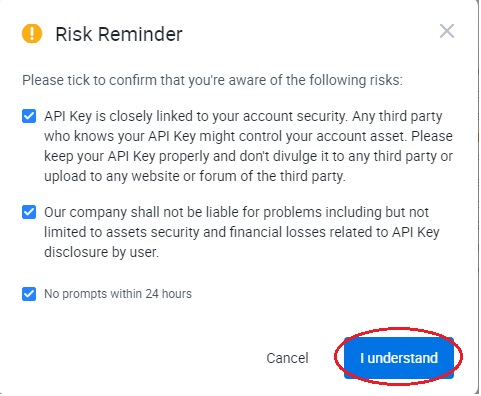
(1)Check all the prompts on the [Risk Warning] page and click [I Know]
(2)Conduct various security verifications (email, mobile phone, Google Authenticator verification)
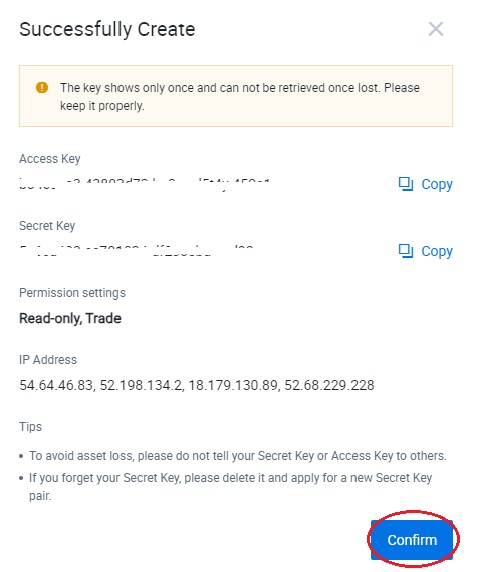
(3)The API Key screen as shown below is generated.
Please copy or take a screenshot to other documents to save it properly, and finally press [OK] to exit.